More jobs. Without ads.
We ask your past customers for Google reviews.
Free until 25 new ones come in. No card. No call. Nothing to sign.
Takes two minutes. For firms trading 3+ years.
How it works
- You fill in the form below.Two minutes. Name, business, three quick questions.
- We send your setup link within minutes.By email and text, 8am to 8pm. Later than that, first thing next morning.
- You connect Google and send your customer list.That's your part done. We start asking your past customers for reviews.
Done, thanks. Your link is on its way.
Your setup link lands by email and text within minutes (8am to 8pm, otherwise first thing next morning). You can do your half right now:
- Send your customer list now. Names plus a mobile number for each, as a spreadsheet or an export from your job app. Email it to [email protected]. Can't export it? Reply to our text and we'll do a quick 10-minute call and pull it off your system together.
- Find the email that owns your Google profile. The one you sign in with to manage your listing. Often an old Gmail. You'll need it when the link lands.
Stuck on either? The help below walks you through it, and there's nothing to pay.
Honestly? Not yet.
The free trial works by asking customers you've already done work for. We only take on firms trading three years or more, with at least 200 past customers and a list with their mobile numbers. Without that there's nobody for us to ask, so it can't work properly yet.
Come back when you've got a couple of hundred jobs behind you and we'll mean it. In the meantime, the single best thing you can do is ask every customer for a review the day after you finish, from your own phone, with your name on the message.
If you think we've got this wrong, email [email protected] and tell us why.
Stuck?
Your part is two jobs. Here's each one, start to finish.
Connecting your Google profileStep by step
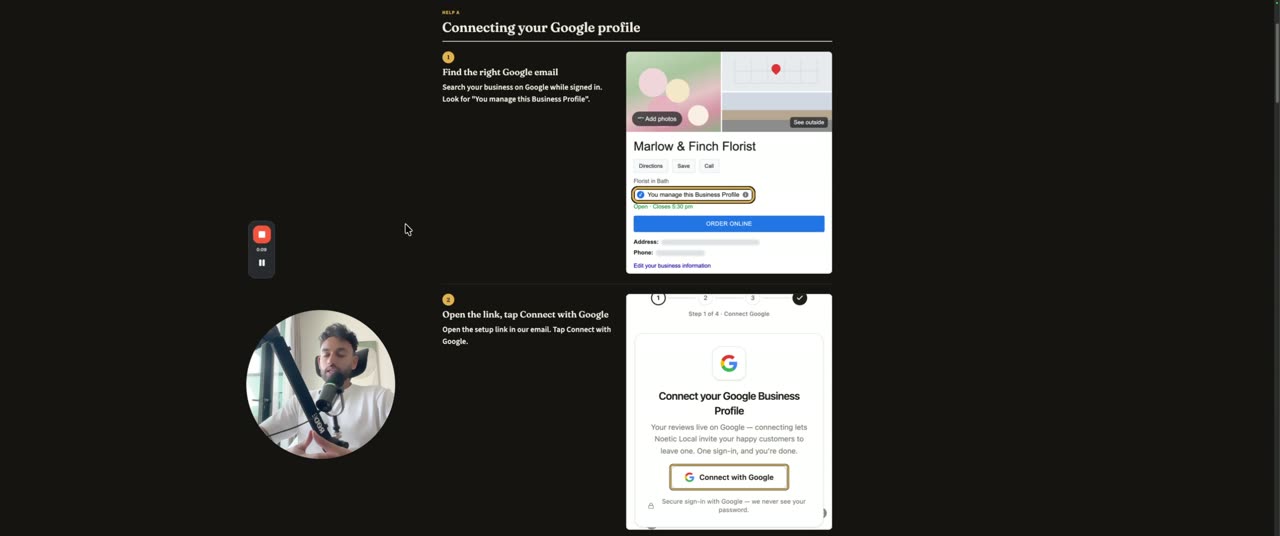
- Find the email that owns your profile. It's the one you sign in with at business.google.com. Not sure? Try your old Gmail first.
- Open your setup link and tap Connect with Google. Sign in with that email.
- Tap Allow, then pick your business from the list. That's it.
Sending your customer listA spreadsheet or an export from your job app
- Use Jobber, Tradify, Xero or QuickBooks? Export your clients or contacts as a spreadsheet. It's usually an Export button on the clients page.
- Email it to [email protected]. Names plus a mobile number for each.
- Can't export it? Reply to our text and we'll do a quick 10-minute call to pull it off your system together.